
Save money. Get rewarded. Always in control.
QUBER is the savings benefit your employer set up for you. Budget around your pay, build your emergency fund automatically, earn incentives just for saving, and keep full access to your money — always.
Getting started
Up and saving in 4 steps
Download QUBER
Available on iPhone and Android. Takes just a few minutes to set up.
Find your employer's program
Search for your group in the app. You may need to verify eligibility with an employee ID to join.
Connect your bank account
Link the account your paycheque goes into. Your savings will be withdrawn automatically on your saving schedule. If your employer has set up payroll deductions, your savings will come directly from your pay instead.
Save, earn, and win
Your balance grows every period. Earn your employer's incentives, stack up Save to Win ballots, and unlock cashback — all at the same time.
Everything in one app
Built to actually change your relationship with money
My Budget
Build a budget around your pay cycle instead of the calendar month. QUBER spreads rent, bills and the irregular costs that catch you out — car repairs, school fees, the annual renewal — across your paycheques, then shows you what's genuinely safe to spend this pay period. No bank connection needed to start.
Saving Jars
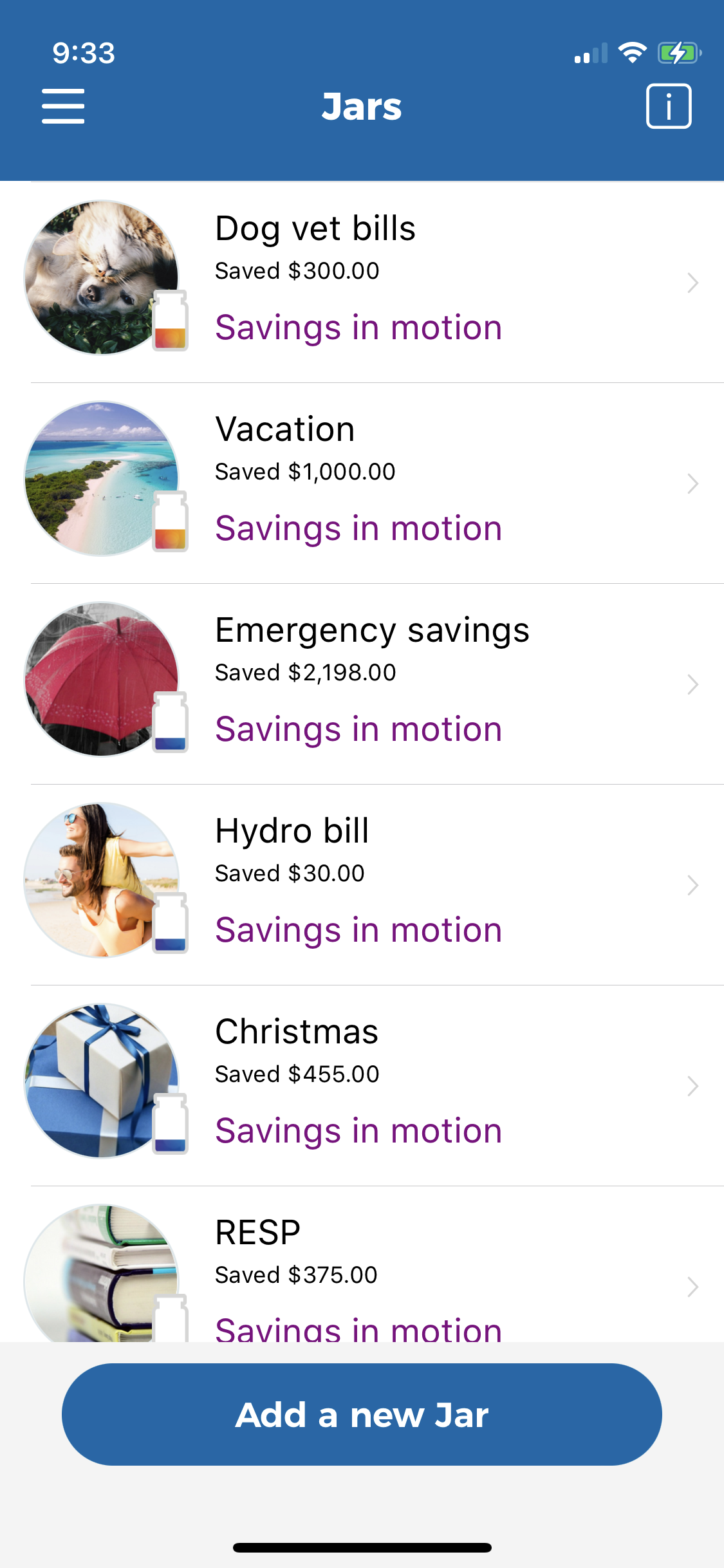
Create separate savings buckets for every goal — emergency fund, rent, a vacation, holiday gifts. Save a little from each pay automatically. When the bill arrives, cash out from that Jar — no scrambling, no credit card stress.
Your employer's incentives
Whether it's matched contributions, rewards, or prize draw entries — your employer's incentive is deposited automatically as you save. The more consistent you are, the more you earn.
Save to Win draws
As your Vault balance grows, you automatically earn ballot entries for monthly cash prize draws. You're entered automatically — the longer you keep saving, the more chances you have to win.
Cashback rewards
Shop with QUBER's cashback partners and earn real money back — automatically deposited into your Rewards. No codes, no coupons. Browse offers in the app under Main Menu → Cashback.
Round Ups
Set up Round Ups inside a Saving Jar and QUBER will round up each purchase to the nearest dollar, saving the difference automatically. Small change adds up faster than you'd expect.
Monthly incentives (APY)
Your Vault balance earns a monthly incentive rate — so your savings grow automatically without you lifting a finger. Check your rate in the app under Rewards.
Common questions
Good questions. Here are real answers.
How is QUBER different from my savings account or TFSA?
A savings account or TFSA is a container — it holds money you already decided to save, but it doesn't help you build the habit. QUBER is the behavioral system that actually gets you saving consistently: automatic deposits, employer incentives, prize draw entries, and science-backed nudges that keep you on track. Many members use QUBER for short-term emergency savings and transfer funds to a long-term account like a TFSA or IRA when they're ready. They work together.
Is my money locked in? Can I take it out anytime?
Yes — your money is always yours. You can cash out your principal contributions at any time with no fees and no penalties. Funds typically reach your bank account within 1–2 business days. Some employer incentives may have specific terms, but your own deposits are never locked in.
Can my employer see how much I'm saving?
No. Your individual savings balance and activity are private. Your employer only receives aggregate reporting — program-level metrics like participation rates and total group savings. They never see your personal account details.
What happens to my savings if I leave my job?
Your savings stay yours. Your Vault balance doesn't disappear when you change jobs. You'll still have access to your account and your money. Depending on your employer's program terms, incentive eligibility may change — but your contributions are always accessible.
Your employer is already set up.
Now it's your turn.
Download QUBER and activate your savings benefit today.
Not set up at your workplace yet? Ask your HR team to book a demo →